Configure AI models for Agent Memory
Configure the AI models and provider API key used by an Agent Memory service on Redis Cloud.
| Redis Iris |
|---|
You can use Redis-managed credentials for the AI models used by an Agent Memory service, or bring your own model provider API key.
Choose who supplies the model credentials
Agent Memory uses two AI models:
| Model | Purpose |
|---|---|
| Large language model (LLM) | Extracts long-term memories from sessions and summarizes session messages. |
| Embedding model | Creates vector embeddings used to find relevant long-term memories. |
When you create a service, choose one of these credential sources:
| Credential source | Behavior |
|---|---|
| Use Redis in-built keys | Redis manages the model credentials. You do not select models or provide a model provider API key. |
| Bring my own key | You select the provider and models. Agent Memory uses your provider API key and provider account for both LLM and embedding calls. |
Available LLM model choices can change. Use the Redis Cloud console to see the current choices. Provider and model values shown in this guide's screenshots are examples.
Prepare your provider account
Before you use your own key, make sure:
- The provider API key is active.
- The provider account has enough quota for LLM and embedding calls.
- The provider account can use the models that you select.
- You understand the provider's billing, service terms, and data-handling policies. The selected LLM processes session content used for extraction and summarization. The embedding model processes the text needed to create embeddings for long-term-memory storage and search.
Use your own key when you create a service
To configure your own model provider key:
-
Start the custom service creation flow.
-
In AI model and credentials (optional), select Bring my own key.
-
Select a Provider.
-
Enter the provider API key.
-
Select an LLM model.
-
Select an Embedding model.
-
Complete the other service settings, then select Create.
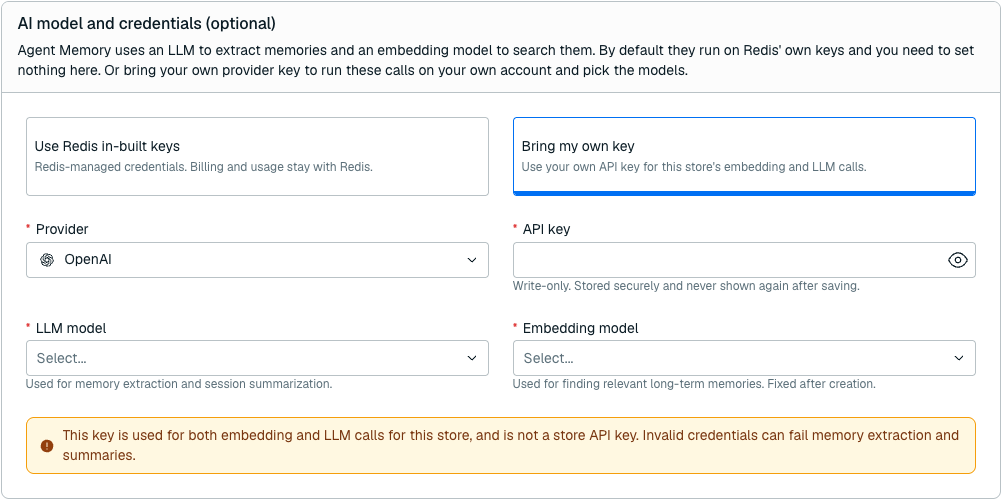
The key is used for both the LLM and embedding calls. Redis stores the key securely and does not show it again after you create the service.
View the current model configuration
To view the configuration:
-
In the Redis Cloud console, select Agent Memory.
-
Select the service.
-
On the Configuration tab, find AI model and credentials.

The User-managed status confirms that the service uses your provider key. Redis does not display or return the saved value.
Change the LLM model or rotate the key
You can change the LLM model and replace the provider API key. You cannot change the provider or embedding model.
To update the service:
-
On the service Configuration tab, select Edit.
-
To change the LLM model, select another LLM model.
-
To rotate the provider key, enter a new value in Replace API key. Leave this field empty to keep the current key.
-
Select Save.
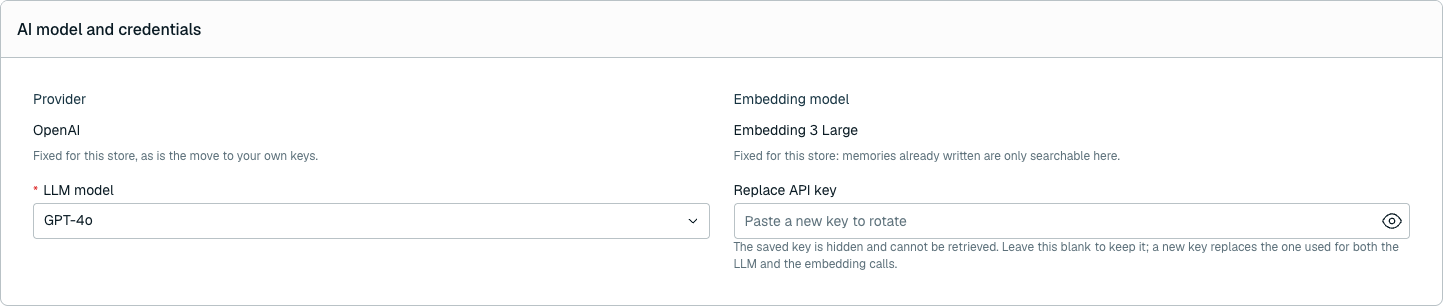
After the update completes, new operations use the replacement key. Operations that were already in progress can continue to use the previous key. The replacement applies to both LLM and embedding calls.
Redis protects the provider key
- Redis stores the provider key securely.
- The key is write-only. Redis does not display or return it after saving.
- The key does not appear in the service's model configuration.
- Deleting the Agent Memory service also deletes the stored provider key.
- A service created with a provider key does not fall back to Redis-managed credentials.
Resolve provider key and quota errors
Model-backed operations can fail when the provider rejects the key or reports that the model quota was exceeded.
For synchronous API operations, Agent Memory returns these conditions as 424 Failed Dependency responses:
| Error | Meaning | What to do |
|---|---|---|
| Invalid Model Credentials | The selected model credentials are missing or invalid. | Confirm that the provider key is active. If necessary, replace the key, then retry the operation. |
| Model Quota Exceeded | The provider reported that the selected model account exceeded its model quota. | Check the provider account's quota and billing status. Resolve any problem, then retry the operation. |
Failures in asynchronous extraction or summarization might not appear in the API call that added the session messages. If expected memories or summaries do not appear:
-
Confirm that the provider key is still active.
-
Confirm that the provider does not report that the model quota was exceeded.
-
If the key is valid and quota is available, contact support.